

Tinycast
A free, open source macOS launcher for apps, clipboard history, snippets, and windows.
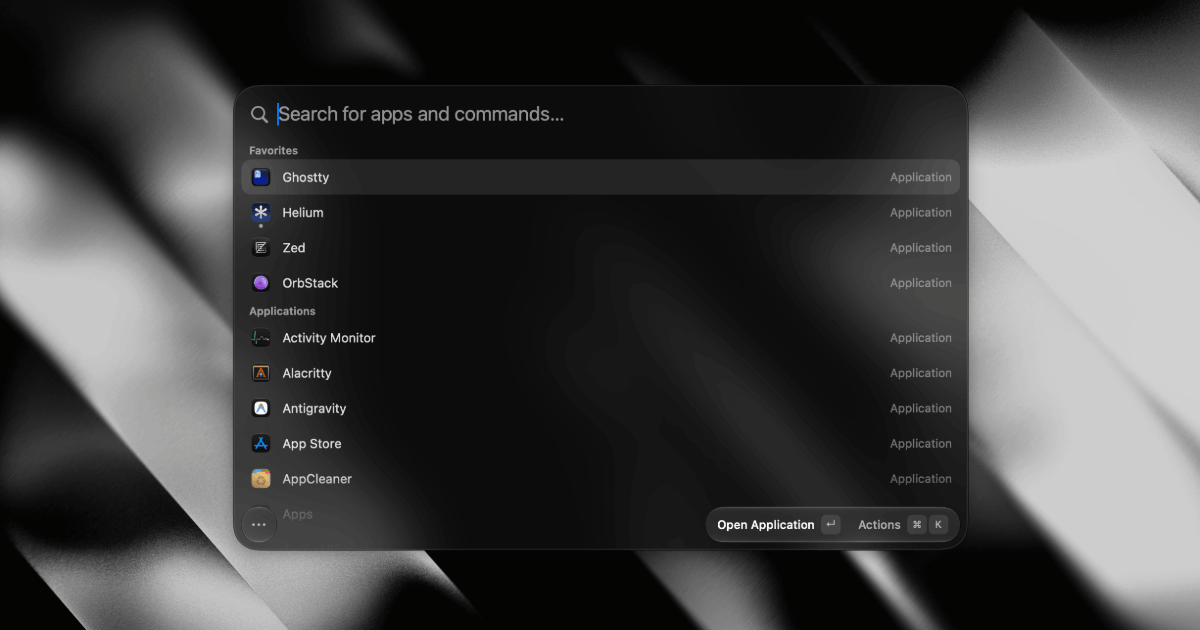
Tinycast is a native macOS launcher with app search, clipboard history, snippets, custom commands, window management, and AI features. It lets users launch and control Mac apps and tools from the keyboard. Listed under Productivity on UsefulShelf. Pricing: Free. Available on macOS.
https://usefulshelf.co/apps/tinycast
Overview
Tinycast is a native macOS launcher with app search, clipboard history, snippets, custom commands, window management, and AI features. It lets users launch and control Mac apps and tools from the keyboard.
The problem
It helps people find and control apps, files, clips, notes, and windows quickly from the keyboard instead of switching between separate tools.
How it works
Install Tinycast on macOS, open the palette with a shortcut, then type to search, run actions, or trigger features like clipboard history, snippets, and AI chat.
Key features
- App launcher
- Clipboard history
- Quick Actions for rewrite, translate, summarize, and more
- Window management
- Raycast extensions import
What makes it different
It is native, open source, and has no account or telemetry; the page says it is written in Swift 6 with SwiftUI and AppKit.
Use cases
Use it to launch apps, search clipboard history, manage windows, or run AI-assisted quick actions from the keyboard.
Every listing is reviewed before it goes live. How review works
Frequently asked questions
What is Tinycast?
Tinycast is a native macOS launcher with app search, clipboard history, snippets, custom commands, window management, and AI features. It lets users launch and control Mac apps and tools from the keyboard.
Who is Tinycast for?
macOS users.
How does Tinycast work?
Install Tinycast on macOS, open the palette with a shortcut, then type to search, run actions, or trigger features like clipboard history, snippets, and AI chat.
What makes Tinycast different?
It is native, open source, and has no account or telemetry; the page says it is written in Swift 6 with SwiftUI and AppKit.
When would someone use Tinycast?
Use it to launch apps, search clipboard history, manage windows, or run AI-assisted quick actions from the keyboard.
What are the key features of Tinycast?
App launcher. Clipboard history. Quick Actions for rewrite, translate, summarize, and more. Window management. Raycast extensions import.
How is Tinycast priced?
Its listing shows a free pricing model. Check the official website for current plans and limits.
Where can I use Tinycast?
Tinycast is available on macOS.
What technical traits does Tinycast have?
Tinycast is tagged as AI-powered and Open source.
Where is the official Tinycast website?
Tinycast is at tinycast.dev. UsefulShelf links to it directly from this page.
Ratings & reviews
Real experiences. A little perspective for your next pick.
Tried Tinycast?
Your experience can help someone find their next useful app.
Sign in to review One account. One honest review.One review per account. Makers can’t rate their own apps. Ratings reflect community opinions.
The first word could be yours.
Tried Tinycast? A few honest lines can make someone’s decision a little easier.
Share your experienceKeep exploring
More useful apps to discover.


A free markdown note-taking app for macOS, Windows and Linux with an optional AI panel.

Free dictation app for Mac and Windows that types your speech at the cursor.

An infinite canvas operating system for teams and AI agents to work together on one shared canvas.