

SnapPChart
AI chart analysis tool for traders that grades chart screenshots and returns a trade setup.
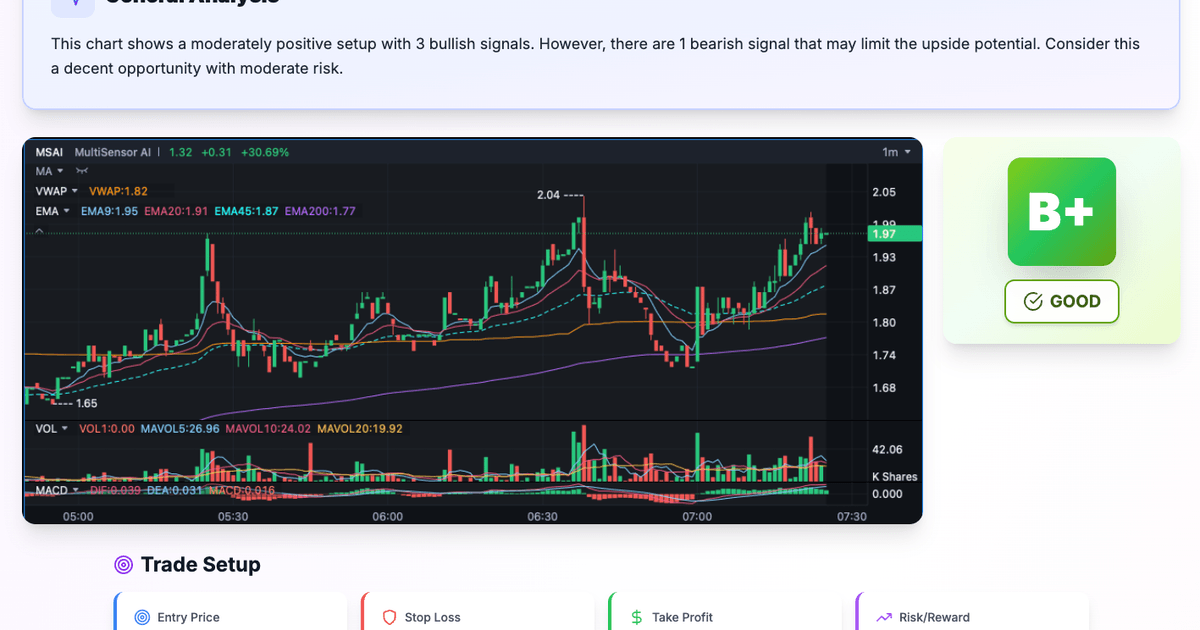
SnapPChart analyzes chart screenshots and grades the setup A+ to F. It returns a directional call and, on paid plans, entry, stop, targets, and risk context. Listed under Fintech on UsefulShelf. Pricing: Free and Subscription. Available on Web, Android and iOS.
https://usefulshelf.co/apps/snappchart
Overview
SnapPChart analyzes chart screenshots and grades the setup A+ to F. It returns a directional call and, on paid plans, entry, stop, targets, and risk context.
The problem
It helps traders review a setup before entering so they can avoid trading on a hunch.
How it works
Upload a chart screenshot with visible price and time axes. The AI analyzes the chart, grades the setup, and returns a take, wait, or skip call with supporting analysis and, on paid plans, a trade plan.
Key features
- Grades chart screenshots from A+ to F
- Gives a take, wait, or skip call
- Analyzes structure, indicators, pattern, and risk context
- Paid plans add entry, stop, targets, and trade plans
What makes it different
It uses screenshot-based AI analysis and a custom trading profile for each user.
Use cases
Use it right before entering a trade to check the setup. Use it to review stock, forex, crypto, or futures chart screenshots.
Every listing is reviewed before it goes live. How review works
Frequently asked questions
What is SnapPChart?
SnapPChart analyzes chart screenshots and grades the setup A+ to F. It returns a directional call and, on paid plans, entry, stop, targets, and risk context.
Who is SnapPChart for?
Day traders, momentum traders, scalpers, swing traders, and prop firm challenge traders.
How does SnapPChart work?
Upload a chart screenshot with visible price and time axes. The AI analyzes the chart, grades the setup, and returns a take, wait, or skip call with supporting analysis and, on paid plans, a trade plan.
What makes SnapPChart different?
It uses screenshot-based AI analysis and a custom trading profile for each user.
When would someone use SnapPChart?
Use it right before entering a trade to check the setup. Use it to review stock, forex, crypto, or futures chart screenshots.
What are the key features of SnapPChart?
Grades chart screenshots from A+ to F. Gives a take, wait, or skip call. Analyzes structure, indicators, pattern, and risk context. Paid plans add entry, stop, targets, and trade plans.
How is SnapPChart priced?
Its listing shows a free and subscription pricing model. Check the official website for current plans and limits.
Where can I use SnapPChart?
SnapPChart is available on Web, Android and iOS.
What technical traits does SnapPChart have?
SnapPChart is tagged as AI-powered.
Where is the official SnapPChart website?
SnapPChart is at snappchart.app. UsefulShelf links to it directly from this page.
Ratings & reviews
Real experiences. A little perspective for your next pick.
Tried SnapPChart?
Your experience can help someone find their next useful app.
Sign in to review One account. One honest review.One review per account. Makers can’t rate their own apps. Ratings reflect community opinions.
The first word could be yours.
Tried SnapPChart? A few honest lines can make someone’s decision a little easier.
Share your experienceKeep exploring
More useful apps to discover.


Independent stock research, financial models, and learning guides for people investing their own money.


Kostenlose Wunschzettel für jeden Anlass erstellen und per Link teilen.


An AI model and notes space for people using it.