Tegaki
Open-source handwriting animation library and generator for the web.
Tegaki turns any font into text that writes itself stroke by stroke in natural stroke order. It draws over real, selectable DOM text and can generate custom font bundles in the browser. Listed under Developer tools on UsefulShelf. Pricing: Free. Available on Web.
https://usefulshelf.co/apps/tegaki
Overview
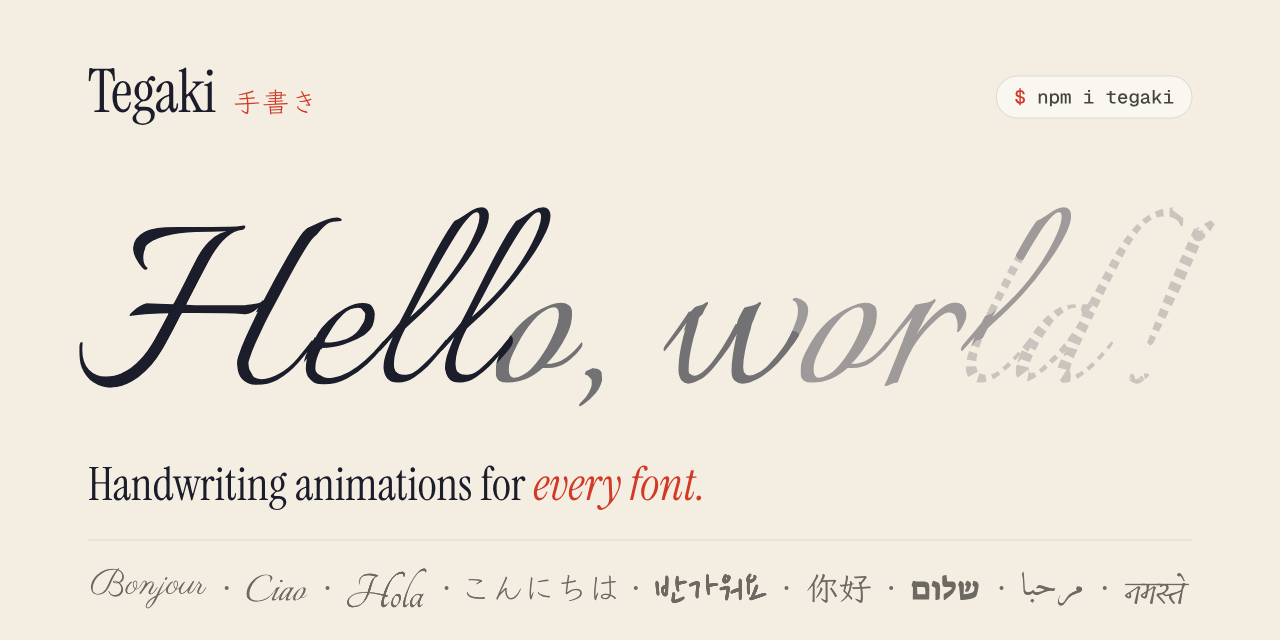
Tegaki turns any font into text that writes itself stroke by stroke in natural stroke order. It draws over real, selectable DOM text and can generate custom font bundles in the browser.
The problem
It solves the need to animate text as handwriting in a way that follows stroke order and works with real text.
How it works
Install the package, import a font bundle or generate one in the Studio, then render text with the Tegaki renderer. You can also control timing, stream text, or export animations through Studio or Remotion.
Key features
- Animates handwriting stroke by stroke from any font
- Supports React, Svelte, Vue, Nuxt, SolidJS, Astro, Web Components, and vanilla JavaScript
- Provides a browser-based Studio for generating font bundles
- Exports PNG, GIF, WebM, animated SVG, and MP4 via Remotion
What makes it different
It animates the centerline of each stroke with its real width in natural stroke order, instead of tracing letter outlines.
Use cases
Use it to add handwriting animation to a website, or to export handwriting animations for video.
Every listing is reviewed before it goes live. How review works
Frequently asked questions
What is Tegaki?
Tegaki turns any font into text that writes itself stroke by stroke in natural stroke order. It draws over real, selectable DOM text and can generate custom font bundles in the browser.
Who is Tegaki for?
Developers building websites and apps with React, Svelte, Vue, SolidJS, Astro, Web Components, vanilla JavaScript, or Remotion.
How does Tegaki work?
Install the package, import a font bundle or generate one in the Studio, then render text with the Tegaki renderer. You can also control timing, stream text, or export animations through Studio or Remotion.
What makes Tegaki different?
It animates the centerline of each stroke with its real width in natural stroke order, instead of tracing letter outlines.
When would someone use Tegaki?
Use it to add handwriting animation to a website, or to export handwriting animations for video.
What are the key features of Tegaki?
Animates handwriting stroke by stroke from any font. Supports React, Svelte, Vue, Nuxt, SolidJS, Astro, Web Components, and vanilla JavaScript. Provides a browser-based Studio for generating font bundles. Exports PNG, GIF, WebM, animated SVG, and MP4 via Remotion.
How is Tegaki priced?
Its listing shows a free pricing model. Check the official website for current plans and limits.
Where can I use Tegaki?
Tegaki is available on Web.
What technical traits does Tegaki have?
Tegaki is tagged as API and Open source.
Where is the official Tegaki website?
Tegaki is at tegaki.ink. UsefulShelf links to it directly from this page.
Ratings & reviews
Real experiences. A little perspective for your next pick.
Tried Tegaki?
Your experience can help someone find their next useful app.
Sign in to review One account. One honest review.One review per account. Makers can’t rate their own apps. Ratings reflect community opinions.
The first word could be yours.
Tried Tegaki? A few honest lines can make someone’s decision a little easier.
Share your experienceKeep exploring
More useful apps to discover.